Overview
Before diving into microcontrollers, you will explore basic computer programming topics. This will provide the necessary context for writing Arduino code.
C++ Programming Language
By Lainey Tran
& Luke Phimpisane
& Sahil Dhaktode
Nearly four decades old, C++ is one of the most widely used general-purpose programming languages. It is highly versatile, utilized in operating systems, video games, internet browsers, embedded software, and more!
C++ is frequently used in embedded systems programming, especially because it easily interfaces with hardware. You can create and delete data in memory. You also have great awareness and control over where and how the data is stored. This is particularly useful when memory, storage, and processing power are limited. C++ programs can be lightweight and incredibly efficient.
Integrated Development Environment (IDE)
An integrated development environment (IDE) is a suite of applications used for programming. It includes a source-code editor, compiler, debugger, and build automation tools.
When you create a program, you will write and edit it in the source code editor. Then, you will employ the help of the compiler to convert the source code (C++ for example) to machine code, which is readable by the computer. You may also run a debugger to troubleshoot errors while the program is running. These are all a part of the IDE.
Popular IDEs include Microsoft Visual Studio, Eclipse, and IntelliJ IDEA. There are plenty more to choose from, some of which are customized to specific programming languages.
Compilers, Assemblers, and Linkers. Oh My!
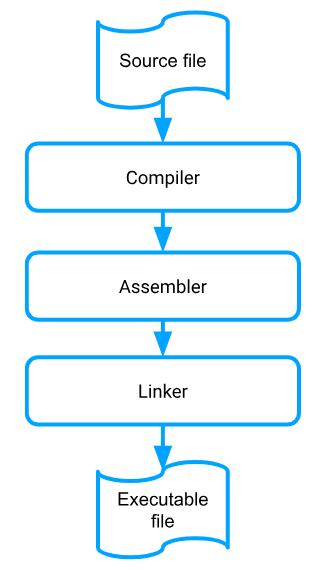
You write code in a programming language like C++, but that is not what the computer executes as instructions. The computer sees only 1s and 0s, or binary machine code. So how do we bridge the communication gap between you and the computer? We use a program called a compiler to translate your C++ code into machine language.
We tend to use “compiler” as an umbrella term to describe what is actually several programs working together to create machine code. In reality, the compiler turns a high-level language like C++ into assembly code.
Assembly language is a low-level programming language based on a computer’s processor. Each assembly statement corresponds directly with a machine instruction or set of instructions. There was a time when most programmers wrote code in assembly language; this is no longer the case.
The assembler converts the assembly language into machine code. We’re not done, though! One last program called a linkertakes the machine code files and “links” them together into an executable file. You might recognize executables as files with the “.exe” extension on Windows. The executable is ultimately what the computer uses to execute your program.
Concepts
Built-in types
We can represent integers with int, truth values with bool, and other types exist too.
int a = 5;
bool k = true;
“a” is an object/variable of type integer. k is an object/variable of type boolean.
Variables
Variables point to values or point to other variables.
int a = 5;
int b = a;
variable a holds the value 5. Note that because we declared a as an int, 5 is an int. b points to a, therefore, b points to 5. We can modify the value of a variable.
a = 5 + 2;
“a” now gets 7. Note that we did not add an int in front of “a” this time, because we already declared “a”.
Functions
A function has a name and takes as inputs a number of values (could be zero). You define a function with the return type (output type), followed by the function name, followed by the parameters (inputs). After the header, you write the function logic. Ex:
void printName(string name){ #function header
	cout << “hi ” << name; #print syntax to output console
}
You call the function like this:
printName(“bob”)
output: “hi bob”
Notice that there is no return statement and the return type is void. This is because the function does not output a value. It does print a statement, but that is internal to the function, which does not return anything. Below is an example of a function with a return statement.
int square(int val){
	return val * val;
}
The function takes as input an integer val, and returns (or outputs) the square of val.
Pass by Value vs Pass by Reference
The variable whose value you pass in as the function’s parameter may be modified or not, depending on how you write your function. This can be a difficult idea to understand, so let's see an example.
int squareModify(int & val){
	return val * val;
}
int square(int val){
	return val * val;
}
int main(){
     int k = 5;
     cout << k << endl; #k is 5
     square(k);
     cout << k << endl; #k is still: 5
     squareModify(k);
     cout << k << endl; #k is now: 5
}
What happened? Initially, k is 5. Then you call square, which takes in a copy of k. So when you do val * val you are not squaring k itself, but a copy of it. This is called pass by copy. That’s why k is still 5. But when you call squareModify, its input is a reference to k as denoted by int & val. So, val in squareModify points to k in main. When you square val, you modify k. That's why k becomes 25. This is called pass by reference.
Conditional Logic
Now, what if we wanted different outputs depending on our function's inputs? An if-else statement does this.
if (condition 1){
	Execute if true
}
else
Execute if condition 1 is false
if (condition 1){
	//Execute if true
}
else if (condition 2) {
	//Execute if condition 2 is true and condition 1 is false
}
else
	Execute if all is false
Here's an example used in a function:
bool isNegative(int k){
	if (k < 0){
		return true;
	}
	else{
		return false;
	}
}
User-Defined Types
Remember how we talked about built-in types? You can define your own types. EX:
struct Person {
    string name;
    int age;

    // Method inside struct
    void introduce() {
        cout << "Hi, I'm " << name << " and I'm " << age << " years old." << endl;
    }
};

int main() {
    Person p1;
    p1.name = "Alice";
    p1.age = 25;

    p1.introduce();  // Call the method

    return 0;
}
Variable p1 is of type Person. We also call p1 a Person object. When we define our own type/object, we often assign data fields and member functions to that object. Here, Person has a name and an age. We can access and modify these data fields, which are formally called attributes. p1.name returns the name of p1. A function that you call on an object is called a method. p1.introduce() calls this function. Note that no parameters are needed. name and age are already part of p1 so they are implicit inputs to the function.
Basic Function Practice
Before we get started, you will need to choose an IDE. For this programming guide, any online C++ IDE is fine. You can use this: https://www.online-ide.com/online_c++_ide
You will write six functions. The requirements for each function are listed below, along with the solutions. Though do your best to come up with the solutions yourself first.
Copy the following code to serve as a template for the first five practice functions:
#include
#include
void echo() {
	// Write code here
	// Print something to the console
}
bool isEven(int num) {
	// Write code here
	return true; // Placeholder
}
unsigned pow(unsigned base, unsigned exp) {
	// Write code here
	return 0; // Placeholder
}
double avg(int arr[], int size) {
	// Write code here
	return 0; // Placeholder
}
void fib(unsignedint) {
	// Write code here
	return; // Placeholder
}
void swap(int& num1, int& num2) {
	// Write code here
	return; // Placeholder
}
int main() {
	// You can test your functions here
	return 0;
}
1. Echo
- Function Header:
void echo() - Parameters: None
- Return: None
- Description:
echo()uses the standard input/output stream. When the function is called, the user types in one text string to the console. The function then prints that identical string back to the console.
Hint
These objects may be helpful: cout, cin
Echo Solution
#include
2. Even or Odd?
- Function Header:
bool isEven(int num) - Parameters: num (int)
- Return: bool
- Description: isEven() returns true if the parameter num is an even number and false if otherwise. num can be any integer value, negative or positive.
- Examples:
isEven(62) : trueisEven(3) : falseisEven(-2) : trueisEven(0) : true
Hint 1
When dividing an even number by 2, there is no remainder. However, dividing an odd number by 2 results in a remainder of 1Hint 2
The modulus % operator returns the remainder of a division operation.Even Odd Solution
bool isEven(int num) {
	if (num % 2 == 0) {
		return true;
	}
      return false;
}
3. Number Power
- Function Header:
unsigned pow2(unsigned base, unsigned exp) - Parameters: base (unsigned int), exp (unsigned int)
- Return: unsigned int
- Description:
pow2()returns the calculated value ofbaseraised to the power ofexp(i.e. base exp). The parameters can only be positive integers. - Examples:
pow2(6, 2) : 36pow2(1, 8) : 1pow2(9, 3) : 729
Hint 1
Remember that raising the base to the power of an exponent is the same as multiplying the base by itself the number of times equal to the exponent.Hint 2
Consider using a for loop.Number Power Solution
unsigned pow2(unsigned base, unsigned exp) {
	unsigned num = base;
	for (int i = 1; i < exp; ++i) {
		num = num * num;
	}
	return num;
}
4. Take the Average
- Function Header:
double avg(int arr[], int size) - Parameters: arr (int array), size (int)
- Return: double
- Description:
avg()returns the mean of the elements in the arrayarr. The array must not be mutated by the function. Its elements may be positive or negative.
Hint 1
Recall the formula for calculating the mean of a number set.Hint 2
Consider using a for loop.Take the Average Solution
double avg(int arr[], int size) {
	double sum = 0;
	for (int i = 0; i < size; ++i) {
		sum = sum + arr[i];
	}
	double average = sum / size;
	return average;
}
5. Fibonacci Sequence
- Function Header:
void fib(unsigned n) - Parameters: n (unsigned int)
- Return: None
- Description:
fib()prints the first n elements of the Fibonacci sequence to the console. Each element should be separated by a comma and one space. The last element terminates the line without a space or comma.n > 0 - Examples:
fib(1) : 1fib(4) : 1, 1, 2, 3
Hint 1
Recall the pattern of the Fibonacci Sequence.Hint 2
Consider using a for loop.Fibonacci Sequence Solution
void fib(unsigned n) {
    int a = 0;
    int b = 1;
    if (n == 0) {
        return;
    } else if (n == 1) {
        cout << a;
    } else if (n == 2) {
        cout << a << ", " << b;
    } else {
        cout << a << ", " << b << ", ";
        for (int i = 2; i < n; ++i) {
            int temp = b;
            b = a + b;
            a = temp;
            cout << b;
            if (i < n-1) {
                cout << ", ";
            }

        }
    }
}
6. Swap Integers
- Function Header:
void swap(int& num1, int& num2) - Parameters: num1 (int&), num2 (int&)
- Return: None
- Description:
swap()switches the value of two variables. The parameters can only be references to integers. - Example:
int x = 1;
int y = 5;
swap(x, y);
// x should be 5
// y should be 1
Hint 1
Use int assignment operator =Swap Integers Solution
void swap(int& a, int& b) {
    int temp = a;
    a = b;
    b = temp;
}